Preparing Your Environment for the AMS360 Integration Relay
Before installing your Synatic SQL Relay, please complete the following quick setup steps. This ensures everything is ready for a smooth installation and connection to your Vertafore AMS360 environment
Step 1: Prepare Your Virtual Machine (VM)
Make sure your hosted VM is ready to run the Synatic Relay. Below are the recommended specifications:
- Operating System: Windows Server (any recent version)
- Processor: Dual Core
- Memory: Minimum 4 GB RAM
- Disk Space: Minimum 200 MB available
The VM should be hosted in an environment that can install and run standard Windows services.
If your organization uses a different OS, Synatic can assist on a case-by-case basis.
Step 2: Configure VPN Access to AMS360 SQL
Your VM must have secure access to your AMS360 SQL environment, which is hosted by Vertafore.
Ensure a VPN client is installed on the VM. Any VPN client is acceptable (e.g., FortiClient, Cisco AnyConnect, OpenVPN, etc.).
Work with your Vertafore representative to confirm that:
- Your VPN connection is configured correctly.
- You have an active subscription or license that allows SQL access.
- Vertafore provides all connection details (server name, credentials).
Step 3: Verify Connectivity
Before installing the Synatic Relay, please confirm that your environment can communicate with AMS360. Connect your VPN client and verify connection stability (the VPN should stay connected without interruption), and then ping your AMS360 SQL host from the VM. To do this:
- Open the Windows Command Prompt and type in “ping {insert AMS360 SQL IP/Hostname}” and ensure that you get a reply as shown in the example below:
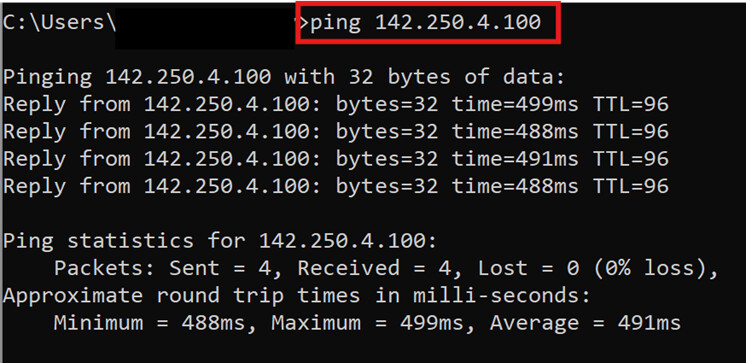
A successful ping confirms the VM can reach AMS360 through your VPN. If the ping fails, double-check your VPN connection and credentials, or contact your Vertafore rep.
Step 4: Synatic Relay Installation
Once your VM and VPN are confirmed, the Relay setup is ready. You can choose one of the following:
Option 1: Synatic assists you during a scheduled session to install and configure the Relay.
Option 2: You install it yourself using Synatic’s Relay Setup and Relay Overview documents (you will receive these documents directly from the Synatic team).
Pre-Installation Verification Checklist
Please confirm the following before your scheduled Relay installation:
Checklist
- VM is running and accessible
- VPN client is installed and connected
- Ping to AMS360 SQL host succeeds
- SQL credentials received from Vertafore rep
- VM meets minimum system requirements
Troubleshooting Tips
If you encounter any issues:
- VPN not connecting? Check your credentials or contact your Vertafore representative.
- Ping fails? Reconnect the VPN and retry. If issues persist, ensure AMS360 SQL access is included in your Vertafore setup.
- Unsure if everything’s ready? Synatic can verify your setup during the installation call.